# Sharing Information

Once users visit spots, they can earn XTR or GXT with the following actions:

## Add overview

<figure><img src="/files/bXy2cqV1gYComwOCmtt4" alt=""><figcaption></figcaption></figure>

## Add photos

<figure><img src="/files/TFsrcOi1IVd2mq9GtWnA" alt=""><figcaption></figcaption></figure>

## Add reviews

The user can only add reviews for the spots that they visited before

Click on the spot to leave a review

<figure><img src="/files/K8fOqVss2EjEu2eZcGOX" alt=""><figcaption></figcaption></figure>

Also, when finishing a trip, the user will see the list of passing spots. The users can add reviews here:

<figure><img src="/files/LW4zzYrrmUHQPeQczwxu" alt=""><figcaption></figcaption></figure>

**Notice**: Only one review or photo for the same spot per month is eligible.&#x20;

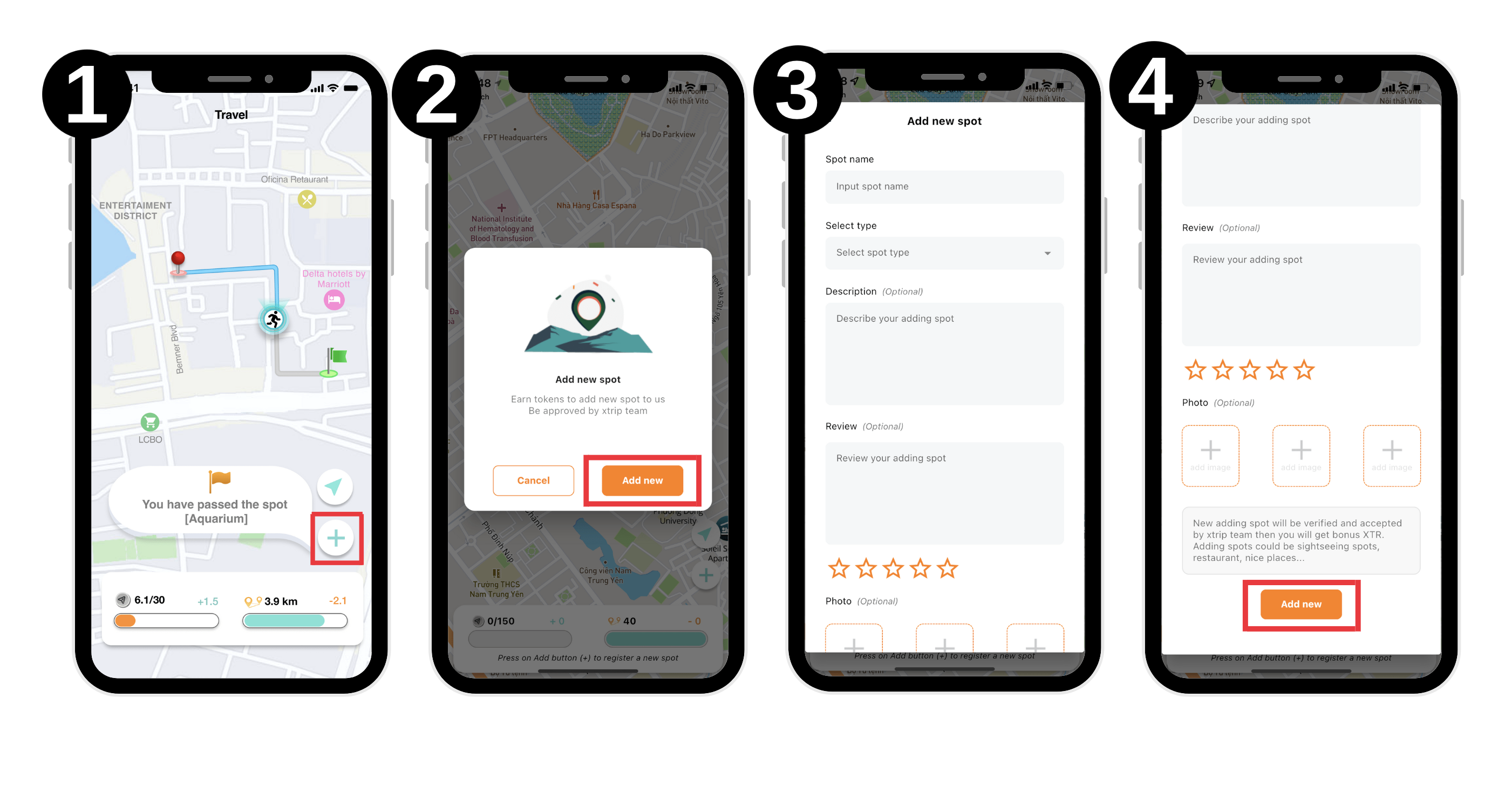
## Register spots, leave review and leave photos without an NFT or traveling

Users who haven’t bought any NFT or on any trip can register spots.&#x20;

To be more specific, they can:

* Share up to 20 reviews/photos daily
* Leave only one review or photo for the same spot per month.&#x20;

<figure><img src="/files/foISmDb82WYUbp6dhny8" alt=""><figcaption><p>Steps to add a new spot</p></figcaption></figure>

<figure><img src="/files/6Ppiq221xHRy25sSpMFi" alt=""><figcaption><p>Steps to add a review about a spot</p></figcaption></figure>

<figure><img src="/files/cDqcwQVjZJ65bv34xIBg" alt=""><figcaption><p>Steps to add photos of a spot</p></figcaption></figure>


---

# Agent Instructions: Querying This Documentation

If you need additional information that is not directly available in this page, you can query the documentation dynamically by asking a question.

Perform an HTTP GET request on the current page URL with the `ask` query parameter:

```
GET https://whitepaper.xtrip.travel/social-fi/sharing-information.md?ask=<question>
```

The question should be specific, self-contained, and written in natural language.
The response will contain a direct answer to the question and relevant excerpts and sources from the documentation.

Use this mechanism when the answer is not explicitly present in the current page, you need clarification or additional context, or you want to retrieve related documentation sections.